Note: This tutorial is written for MCreator software, though the troubleshooting logic is also applicable to other mod developers who use standalone IDEs. This guide includes lightweight code-related sections that require basic programming knowledge to fully understand.
When creating attack animations for custom entities with GeckoLib, new MCreator users often encounter an issue: the entity deals damage long before its lengthy attack animation finishes playing. This happens because the
doHurtTarget method is called as soon as the entity initiates an attack, which instantly calculates and applies damage. To resolve this desync, we use a simple workaround to make the entity deal damage in sync with its attack animation playback.This guide assumes you are developing for Minecraft 1.20.1 with the Forge API, and that you have already installed the GeckoLib and Attributes plugins inside MCreator. We also assume you have finished the basic setup of your animated entity. Now navigate to your entity’s animation settings page.
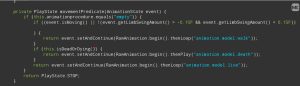
Uncheck the built-in attack animation toggle for your entity, then save your changes. (The corresponding code snippet will appear as shown below.)
Next, create a procedure named something like
[Your Entity Name] Attack, then build its logic using MCreator’s visual block system.Here is a breakdown of the core logic:
- When your animated entity attempts to attack a target, cancel the default attack event to prevent immediate damage application.
- Trigger the custom attack animation you made in Blockbench.
- Add a timed delay (adjust the duration to match your animation’s hit frame; for example, you can set damage to trigger halfway through the animation. Tweak the value based on your entity’s attack motions and visual performance).
- Verify two conditions: the distance between the attacker and target, and whether the attacker is facing its target directly. Calculate straight-line 3D distance with the formula
sqrt((x2-x1)²+(y2-y1)²+(z2-z1)²)to set your desired attack range (replace the constant value 2 with your preferred reach distance). - Insert this line of custom code:
!(entity instanceof LivingEntity && ((LivingEntity) entity).isUsingItem() && ((LivingEntity) entity).getUseItem().getItem().equals(Items.SHIELD))This snippet may break after game version updates. Its function: damage will only apply if the target is not blocking with a shield. If the target holds a shield and blocks successfully, damage is nullified, and standard shield block visual effects will trigger instead.
That covers the overall workflow. If you want to examine a complete practical implementation, check my GitHub repository (this is the remote workspace for the early recode of my Epic Journey 2 mod). Both full source code and MCreator procedure templates are placed inside the tutorial folder.